 English
 Italian
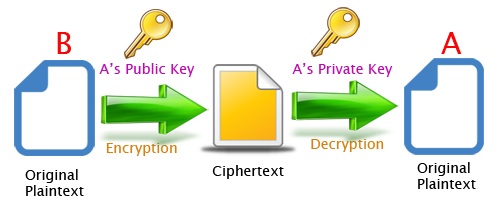
The Java Cryptography Architecture (JCA) allows developers to easily integrate security into their application code. JCA provides a set of APIs for digital signatures, message digests, certificate validation, encryption (symmetric/asymmetric ciphers), key generation and so on. In this article I show how to implement the data encryption and decryption with public-key cryptography (also known as asymmetric cryptography). To do this, I will generate a 2048 bit sized RSA public/private key pair. The public key is used to encrypt a plaintext file, whereas the private key is used to decrypt the ciphertext.
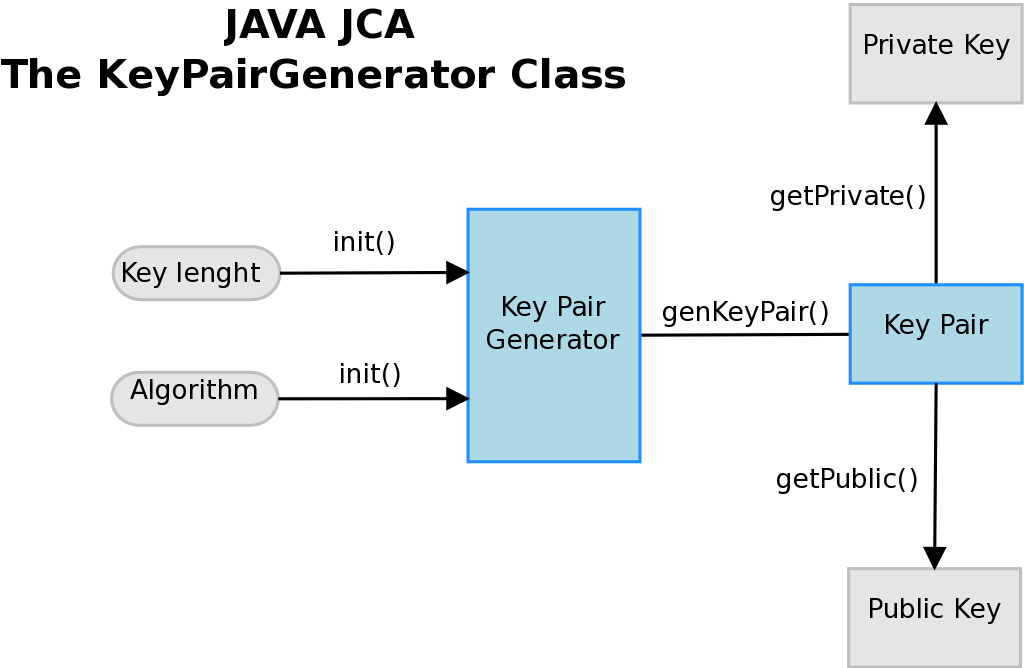
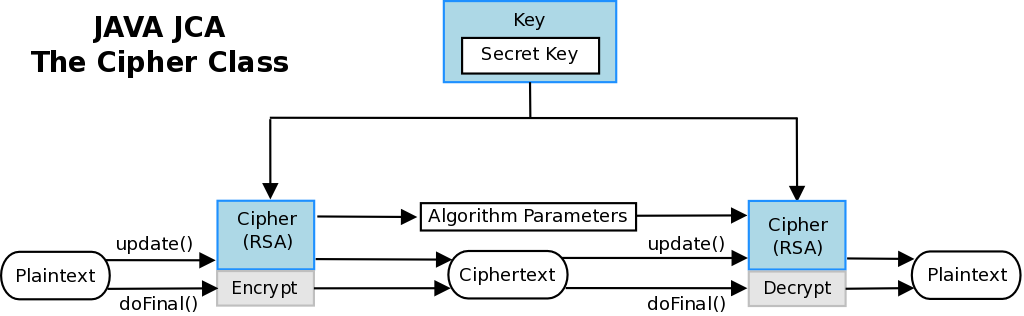
In order to generate the public and private RSA keys I use the KeyPairGenerator object. The functionality for encryption and decryption is provided by the Cipher getInstance method, passing the name of the requested transformation to it (RSA/ECB/PKCS1Padding). The JCA specification calls these classes “engine classes“, follows an high level representation.
ROADMAP
STEP 1. Simple Maven project
STEP 2. Asymmetric Cipher Implementation
STEP 3. Test 2048-RSA file encryption/decryption
STEP 1. Simple Maven Project
I create a simple Maven project using the “quickstart” artifact. In the pom.xml I add the junit and commons-io (apache) dependencies.
mvn archetype:generate \
  -DarchetypeGroupId=org.apache.maven.archetypes \
  -DarchetypeArtifactId=maven-archetype-quickstart \
  -DgroupId=eu.giuseppeurso.sample.security \
  -DartifactId=sample-security
  -Dversion=1.0-SNAPSHOT \
STEP 2. Asymmetric Cipher Implementation
The AsymmetricCipher class has a method to generate a key pair with the java.security.KeyPairGenerator object. The encrypt and decrypt methods use the javax.crypto.Cipher to encrypt/decrypt the data bytes .
public static KeyPair keyPairGenerator (String algorithm, int keysize) throws NoSuchAlgorithmException {
		KeyPairGenerator kpg = KeyPairGenerator.getInstance(algorithm);
		kpg.initialize(keysize);
		KeyPair kp = kpg.generateKeyPair();
		return kp;
	}
public static byte[] encrypt (byte[] inputBytes, PublicKey key, String xform) throws Exception {
		Cipher cipher = Cipher.getInstance(xform);
		cipher.init(Cipher.ENCRYPT_MODE, key);
		return cipher.doFinal(inputBytes);
	}
public static byte[] decrypt (byte[] inputBytes, PrivateKey key,  String xform) throws Exception{
		Cipher cipher = Cipher.getInstance(xform);
		cipher.init(Cipher.DECRYPT_MODE, key);
		return cipher.doFinal(inputBytes);
	}
STEP 3. Test 2048-RSA file encryption/decryption
The AsymmetricCipherTest class performs some unit tests for the above methods. In addition, a full encryption/decryption test is implemented. At first I create the RSA key pair. Then I call the encrypt method passing the plaintext bytes, the public key and the transfomation string. I write the generated output bytes to a new encrypted file (this will not be “human-redable” because encrypted). Finally I decrypt this file using the private key and compare it with the initial clear text bytes.
 /**
* Test a file encyption
*
*/
public void testFileEncyption() throws Exception {
 boolean actual=false;

 // Generate a key-pair
 KeyPair kp = AsymmetricCipher.keyPairGenerator("RSA", 2048);
 PublicKey pubk = kp.getPublic();
 PrivateKey prvk = kp.getPrivate();

 File file = new File(fileToEncrypt);
 byte[] dataBytes = FileUtils.readFileToByteArray(file);
 System.out.println("Source file size is: " + dataBytes.length * 8+ " bits (=" + dataBytes.length + " bytes)");
 System.out.println("RSA key size is: " + 2048 + " bits (= "+ 2048 / 8 + " bytes)");

 // Now start with the file encryption
 String xform = "RSA/ECB/PKCS1Padding";
 byte[] encBytes = AsymmetricCipher.encrypt(dataBytes, pubk, xform);
 file = new File(encryptedFile);
 FileUtils.writeByteArrayToFile(file, encBytes);
 System.out.println("Encrypted file at: " + encryptedFile);

 // Decrypt the generated file
 byte[] decBytes = AsymmetricCipher.decrypt(encBytes, prvk, xform);
 file = new File(unencryptedFile);
 FileUtils.writeByteArrayToFile(file, decBytes);
 System.out.println("Unencrypted file at: " + unencryptedFile);

 // Comparing the original plaintext with the decrypted bytes
 actual = java.util.Arrays.equals(dataBytes, decBytes);
 assertEquals("Invalid decryption.", true, actual);
}
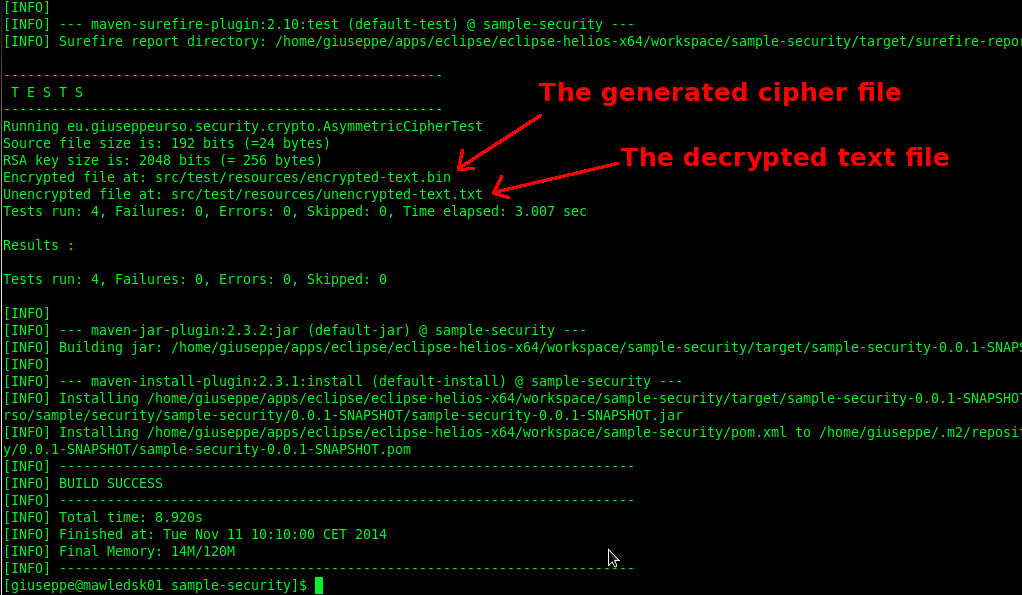
Follows the Maven command to run tests and build the project. If no errors occur, the original plaintext file is the same as the decrypted generated text file.
$ cd sample-security
$ mvn clean install

[INFO] Scanning for projects...
[INFO]
[INFO] ------------------------------------------------------------------------
[INFO] Building Java Security sample 0.0.1-SNAPSHOT
[INFO] ------------------------------------------------------------------------
[INFO]
[INFO] --- maven-clean-plugin:2.4.1:clean (default-clean) @ sample-security ---

[.......]






I found this website in search of Alfresco content repository technical information, and I found what I exactly wanted to learn – Alfresco, check CMIS Session using Spring Interceptor. But at the same time, other pages are so much helpful. really amazing! Thanks so much for sharing your knowledge. I’m sure I will come here often to find other technical resources.
Oh, thanks for your comment. I’m glad it will helpful for you.
In this web site I want to collect a series of useful quick tips I usually use during my daily work.
Sometime in my work experience I need a quick way to consult for settings and maintenances. When I support a customer for troubleshooting I need a practical vademecum…a knowledge collection in a web site is the best way!
Giuseppe 😉
Where does FileUtils came from?
It comes from the Apache Commons IO. Take a look at the dependecies in the pom.xml:
https://github.com/giuseppeurso-eu/java-security/blob/master/jca/pom.xml
replace FileUtils with Files.readAllBytes/Files.write at java seven